
Way To Access AWS Accounts
There are three primary options to access an AWS account:
1. AWS Management Console
This is a web-based user interface that allows users to interact with AWS services visually. Users log in using a username and password, and optionally an MFA code.
This can be protected by Password + MFA
Example:
An IAM user named "alice" logs in at https://console.aws.amazon.com using her username, password, and an MFA code to manage EC2 instances and S3 buckets.
2. AWS Command Line Interface (CLI)
The AWS CLI is a tool that allows users to interact with AWS services from a terminal or command prompt using commands. Users authenticate using access keys (an access key ID and a secret access key).
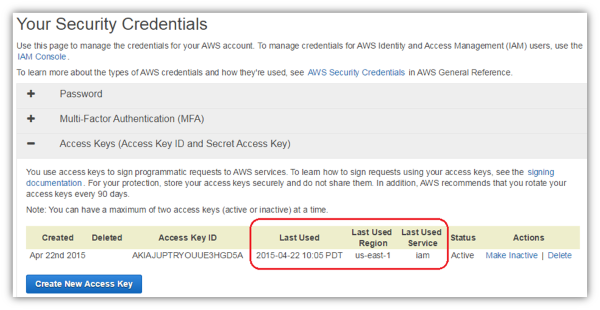
Protected by Access Key
Example:
A developer configures the AWS CLI with their access keys and runs the following command to list all S3 buckets:
aws s3 ls
3. AWS Software Development Kits (SDKs) and APIs
AWS provides SDKs for various programming languages (such as Python, Java, and Node.js) that allow developers to programmatically interact with AWS services. Authentication is done using access keys or IAM roles.
Protected by Access Key
Example:
A Python application uses the AWS SDK for Python (Boto3) to upload a file to an S3 bucket:
import boto3
s3 = boto3.client('s3')
s3.upload_file('localfile.txt', 'my-bucket', 'remotefile.txt')
These three options—Management Console, CLI, and SDKs/APIs—cover the main ways users and applications can access and manage AWS resources.