
Scala Project Structure and Build Tools (sbt)
1. Introduction
In the previous lesson, we installed the JDK, configured the Scala environment, and executed our first Scala program.
Now let's understand how Scala projects are structured in real-world development.
When you work with a small Scala program, you can write code in a single file and execute it directly. However, enterprise applications usually contain multiple source files, external libraries, test cases, and configuration files.
Managing all these components manually would quickly become difficult.
This is where sbt (Scala Build Tool) comes in.
By the end of this lesson, you will understand:
What sbt is and why Scala developers use it.
How a typical Scala project is structured.
What the
build.sbtfile does.How to create a Scala 2 project.
How to compile and run a Scala application using sbt.
How to add external dependencies.
How to execute basic sbt commands.
2. What Is sbt?
sbt stands for Scala Build Tool.
It is a build automation tool primarily used for Scala and Java projects.
Think of sbt as a tool that automates common development tasks.
For example, instead of manually compiling Scala files, managing JAR dependencies, and executing your application, you can use sbt commands.
What can sbt do?
| Feature | Purpose |
|---|---|
| Compilation | Compiles Scala source files into JVM bytecode. |
| Dependency management | Downloads and manages external libraries. |
| Testing | Executes automated test cases. |
| Application execution | Runs your Scala application. |
| Build automation | Automates repetitive build tasks. |
| Project configuration | Manages Scala versions and build settings. |
Java vs Scala Build Tools
If you have worked with Java, you may already know Maven or Gradle.
Scala developers commonly use sbt.
| Java Ecosystem | Scala Ecosystem |
|---|---|
| Maven | sbt |
| Gradle | sbt |
pom.xml | build.sbt |
mvn compile | sbt compile |
mvn test | sbt test |
mvn package | sbt package |
Remember: sbt is not a programming language. It is a build tool used to manage and automate your Scala project.
3. Create Your First Scala Project
Let's create a simple Scala 2 project.
Step 1: Create a project directory
Open your terminal and execute:
mkdir scala-learningcd scala-learningStep 2: Create the project structure
Create the following directories:
mkdir -p src/main/scalamkdir -p src/test/scalaYour project should look like this:
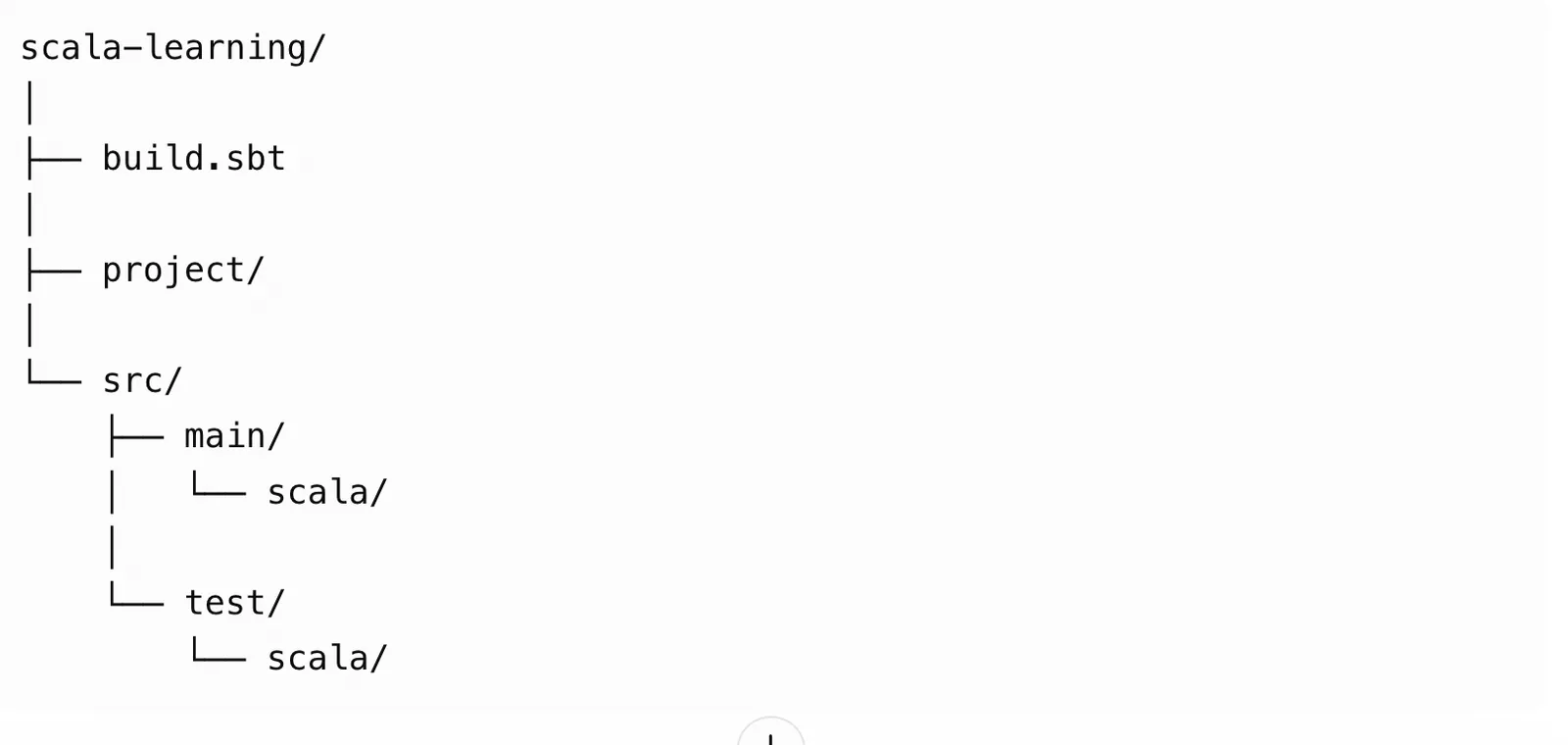
Understanding the directories
| Directory/File | Description |
|---|---|
build.sbt | Contains project configuration and dependencies. |
project/ | Contains sbt build configuration and plugins. |
src/main/scala/ | Contains application source code. |
src/test/scala/ | Contains automated test code. |
You don't need to create every directory manually. sbt and your IDE can help manage the project structure.
4. Understanding build.sbt
The build.sbt file is one of the most important files in an sbt project.
It defines the project name, Scala version, dependencies, and other build settings.
Create a file named build.sbt in your project root.
Add the following configuration:
name := "scala-learning"version := "1.0.0"scalaVersion := "2.13.18"Understanding the configuration
1. Project name
name := "scala-learning"Defines the name of your project.
2. Project version
version := "1.0.0"Defines the current project version.
3. Scala version
scalaVersion := "2.13.18"Specifies the Scala compiler version used by the project.
For this course, we will primarily use Scala 2.13.
Important: The Scala version specified in build.sbt controls the version used to compile the project. It is separate from the JDK version installed on your machine.
5. Write Your First sbt Application
Create a file named Main.scala inside:
src/main/scala/
Add the following code:
object Main { def main(args: Array[String]): Unit = { println("Welcome to Scala!") println("Learning Scala with sbt.") }}Understanding the code
object Main: Defines a Scala singleton object.def main(args: Array[String]): Defines the application's entry point.Array[String]: Represents command-line arguments.Unit: Indicates that the method does not return a meaningful value.println(): Prints text to the console.
Your project structure should now look like this:
scala-learning/
│
├── build.sbt
│
├── project/
│
└── src/
├── main/
│   └── scala/
│       └── Main.scala
│    └── test/
└── scala/
6. Execute Your Scala Application Using sbt
Open the terminal from your project root directory.
First, verify that sbt is installed:
sbt --versionNow execute the application:
sbt runExpected output:
Welcome to Scala!Learning Scala with sbt.Congratulations! You have successfully created and executed a Scala 2 application using sbt.
How does sbt work internally?
When you execute:
sbt runThe build tool performs several operations:
Reads the project configuration from
build.sbt.Resolves the required dependencies.
Compiles Scala source files.
Generates JVM bytecode.
Starts the application on the JVM.
Displays the program output.
Conceptually:
Scala Source Code → sbt → Scala Compiler → JVM Bytecode → JVM → Output
7. Important sbt Commands
As a Scala developer, you will frequently use the following commands.
| Command | Description |
|---|---|
sbt | Starts the sbt interactive shell. |
sbt compile | Compiles the project. |
sbt run | Runs the application. |
sbt test | Executes automated tests. |
sbt clean | Removes generated build files. |
sbt package | Creates a packaged JAR. |
sbt console | Opens the Scala REPL with the project classpath. |
sbt reload | Reloads the build configuration. |
Interactive sbt shell
Instead of running a separate command every time, you can start the sbt shell:
sbtYou will get an interactive prompt.
Now execute commands directly:
> compile> run> test> clean> exitThis is particularly useful when working on larger projects.
8. Understanding Dependencies in Scala
Real-world applications rarely work without external libraries.
For example, you may need libraries for:
JSON processing.
Database connectivity.
Logging.
HTTP clients.
Testing.
Web development.
sbt makes dependency management straightforward.
Let's understand this with an example.
Suppose you want to use the ScalaTest library for unit testing.
Add the following dependency to your build.sbt file:
libraryDependencies += "org.scalatest" %% "scalatest" % "3.2.19" % TestUnderstanding the dependency declaration
| Component | Meaning |
|---|---|
org.scalatest | Library organization |
scalatest | Library name |
3.2.19 | Library version |
%% | Selects the artifact compatible with the project's Scala binary version |
Test | Makes the dependency available in the test scope |
After adding the dependency, execute:
sbt updatesbt resolves and downloads the required library and its transitive dependencies.
Note: Dependency versions should be checked for compatibility with your Scala version and project requirements.
9. Understanding the target Directory
After compiling your project, you will notice a new directory:
target/This directory contains generated build artifacts.
For example:
target/
 └── scala-2.13/
├── classes/
├── test-classes/
└── ...
What is stored inside target?
| Directory | Purpose |
|---|---|
classes/ | Compiled application classes. |
test-classes/ | Compiled test classes. |
| Other build output | Generated files and intermediate build artifacts. |
You generally do not need to modify anything inside target manually.
The directory can be regenerated by sbt.
10. Scala Project Structure: Complete View
A typical Scala application may have the following structure:
scala-learning/
│
├── build.sbt
│
├── project/
│   └── build.properties
│├── src/
│   ├── main/
│   │   ├── scala/
│   │   │   ├── Main.scala
│   │   │   ├── service/
│   │   │   └── model/
│   │   ││
│   └── resources/
│   │
│   └── test/
│       ├── scala/
│       └── resources/
│└── target/
Additional directories
src/main/resources
Stores application resources such as:
Configuration files.
Application properties.
JSON files.
XML files.
src/test/resources
Stores resources required by automated tests.
project/build.properties
Can be used to specify the sbt version.
Example:
sbt.version=1.11.7Use the sbt version selected for your project rather than treating this example as a mandatory version.
Key Takeaways
In this lesson, you learned:
sbt is the primary build automation tool used in many Scala projects.
build.sbtcontains project configuration.Scala source code is generally stored in
src/main/scala.Test source code is generally stored in
src/test/scala.External libraries are managed through
libraryDependencies.sbt can compile, test, package, and execute Scala applications.
Compiled output and other generated artifacts are stored under
target.
You now have a working foundation for developing Scala applications using sbt.