Exception Handling In Java
Exceptions In java and their Utilities with Examples
Exception handling in Java is a mechanism to handle runtime errors, allowing the normal flow of the application to be maintained. It involves using specific keywords like try, catch, finally, throw, and throws.
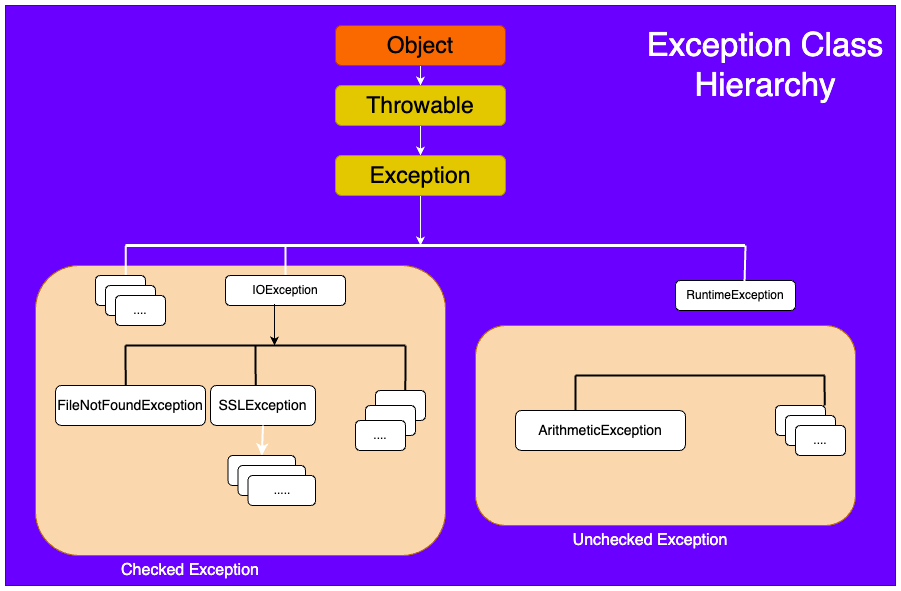
Find Exception Class Heirarchy Below:
1. Try-Catch Block
tryblock: Code that might throw an exception is placed inside thetryblock.catchblock: Handles the exception if one occurs. You can have multiplecatchblocks to handle different types of exceptions.
try {
    int result = 10 / 0; // This will throw an ArithmeticException
} catch (ArithmeticException e) {
    System.out.println("Cannot divide by zero!");
}
2. Finally Block
- The
finallyblock is optional and is used to execute code that must run regardless of whether an exception was caught or not. It's often used for cleanup activities like closing files or releasing resources.
try {
    int result = 10 / 0;
} catch (ArithmeticException e) {
    System.out.println("Cannot divide by zero!");
} finally {
    System.out.println("This will always be executed.");
}
3. Throw and Throws
throwkeyword: Used to explicitly throw an exception.throwskeyword: Declares that a method may throw exceptions, indicating to the caller that they should handle or propagate the exception.
Using throw:
public void checkAge(int age) {
    if(age < 18) {
        throw new ArithmeticException("Access denied - You must be at least 18 years old.");
    } else {
        System.out.println("Access granted - You are old enough!");
    }
}
Using throws:
public void myMethod() throws IOException {
    FileReader file = new FileReader("somefile.txt");
    file.read();
}
4. Custom Exceptions
You can create your own exceptions by extending the Exception class.
class MyCustomException extends Exception {
    public MyCustomException(String message) {
        super(message);
    }
}

public class Test {
    public void checkValue(int value) throws MyCustomException {
        if (value < 0) {
            throw new MyCustomException("Value cannot be negative!");
        }
    }
}
5. Best Practices
- Catch specific exceptions: Always try to catch the most specific exception first to ensure proper handling.
- Never swallow exceptions: Avoid empty
catchblocks; they make debugging difficult. - Use finally for cleanup: Ensure resources like files or connections are properly closed in the
finallyblock. - Custom exceptions: Use custom exceptions for more meaningful error handling in your application.
6. Checked vs. Unchecked Exceptions
Checked Exceptions: These are exceptions that are checked at compile-time. Examples include
IOException,SQLException, etc. You must either handle them using atry-catchblock or declare them usingthrows.Unchecked Exceptions: These are exceptions that occur at runtime and are not checked at compile-time. Examples include
ArithmeticException,NullPointerException, etc. They are typically programming errors and do not need to be declared or caught.
//Example

import java.io.*;

public class ExceptionExample {
    public static void main(String[] args) {
        try {
            FileReader file = new FileReader("test.txt");
            BufferedReader fileInput = new BufferedReader(file);

            // Print first 3 lines of file "test.txt"
            for (int counter = 0; counter < 3; counter++)
                System.out.println(fileInput.readLine());

            fileInput.close();
        } catch (FileNotFoundException e) {
            System.out.println("File not found: " + e.getMessage());
        } catch (IOException e) {
            System.out.println("I/O error occurred: " + e.getMessage());
        } finally {
            System.out.println("This block is executed no matter what.");
        }
    }
}
In this example, FileNotFoundException and IOException are checked exceptions that must be either caught or declared in the method signature.