JDK, JVM and JRE Utilities
Java is one of the most popular programming languages, and its platform is built on three core components: JDK (Java Development Kit), JVM (Java Virtual Machine), and JRE (Java Runtime Environment). These components work together to enable the development, compilation, and execution of Java programs. In this article, we’ll explore each of these components in detail, provide examples, and include a diagram to illustrate their relationships.
What is JDK?
The Java Development Kit (JDK) is a software development environment used to develop Java applications. It includes tools for writing, compiling, and debugging Java programs. The JDK is essential for developers because it provides everything needed to create Java applications.
Key Components of JDK:
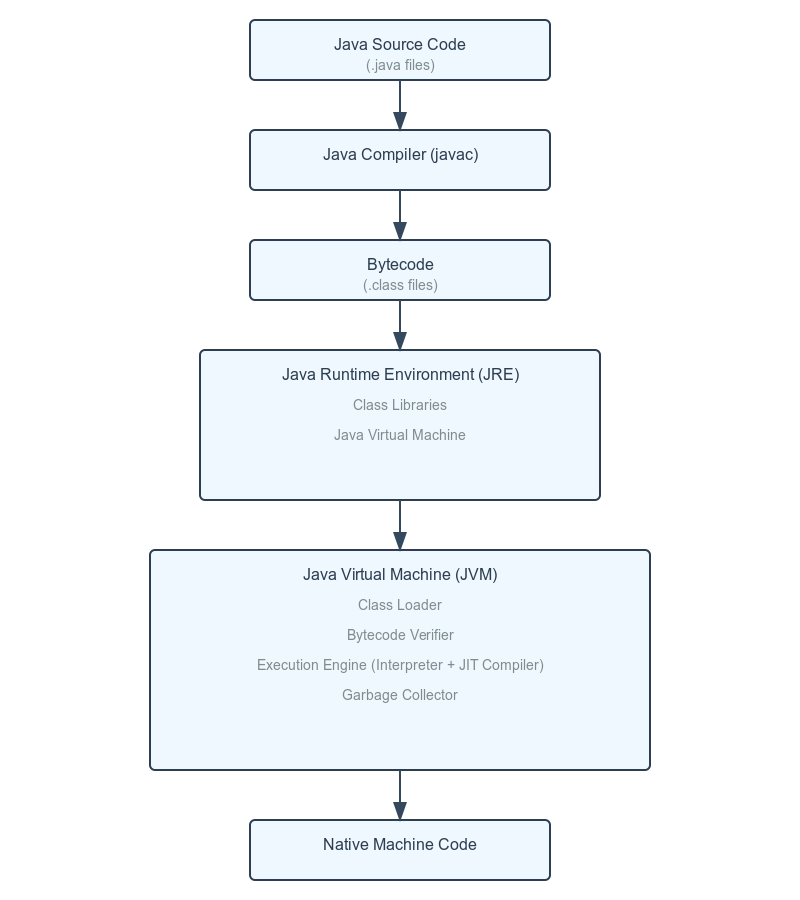
- Java Compiler (javac): Converts Java source code (.java files) into bytecode (.class files).
- Development Tools: Includes tools like jlink, javadoc, and jdb for linking, documenting, and debugging respectively.
- JRE: The JDK includes the JRE, which is required to run Java programs.
Example:
Suppose you write a simple Java program:
public class HelloWorld {

public static void main(String[] args) {
      System.out.println("Hello, World!");
    }
}
To compile and run this program, you need the JDK. The javac compiler converts the HelloWorld.java file into HelloWorld.class (bytecode), which can then be executed by the JVM.
What is JRE?
The Java Runtime Environment (JRE) is a part of the JDK that provides the runtime environment required to execute Java programs. It includes the Java Virtual Machine (JVM) and a set of class libraries that Java programs use.
Key Components of JRE:
- Class Libraries: Predefined classes and APIs (e.g., java.util, java.io) that provide functionality like data structures, file handling, and networking.
- JVM: The JRE includes the JVM, which executes the bytecode.
Example:
If you only want to run a Java program (not develop it), you can install the JRE. For instance, if you have the HelloWorld.class file, the JRE will allow you to execute it using the java command.
What is JVM?
The Java Virtual Machine (JVM) is the heart of the Java platform. It is responsible for executing Java bytecode. The JVM is platform-dependent, meaning it is tailored for specific operating systems, but it provides a platform-independent execution environment for Java programs.
Key Components of JVM:
- Class Loader: Loads .class files into memory.
- Bytecode Verifier: Ensures the bytecode is valid and secure.
- Execution Engine: Executes the bytecode. It includes:
- Interpreter: Executes bytecode line by line.
- Just-In-Time (JIT) Compiler: Converts bytecode into native machine code for faster execution.
- Garbage Collector: Automatically manages memory by removing unused objects.
Example:
When you run the HelloWorld.class file using the java command, the JVM:
- Loads the bytecode into memory using the Class Loader.
- Verifies the bytecode for security.
- Executes the bytecode using the Execution Engine.
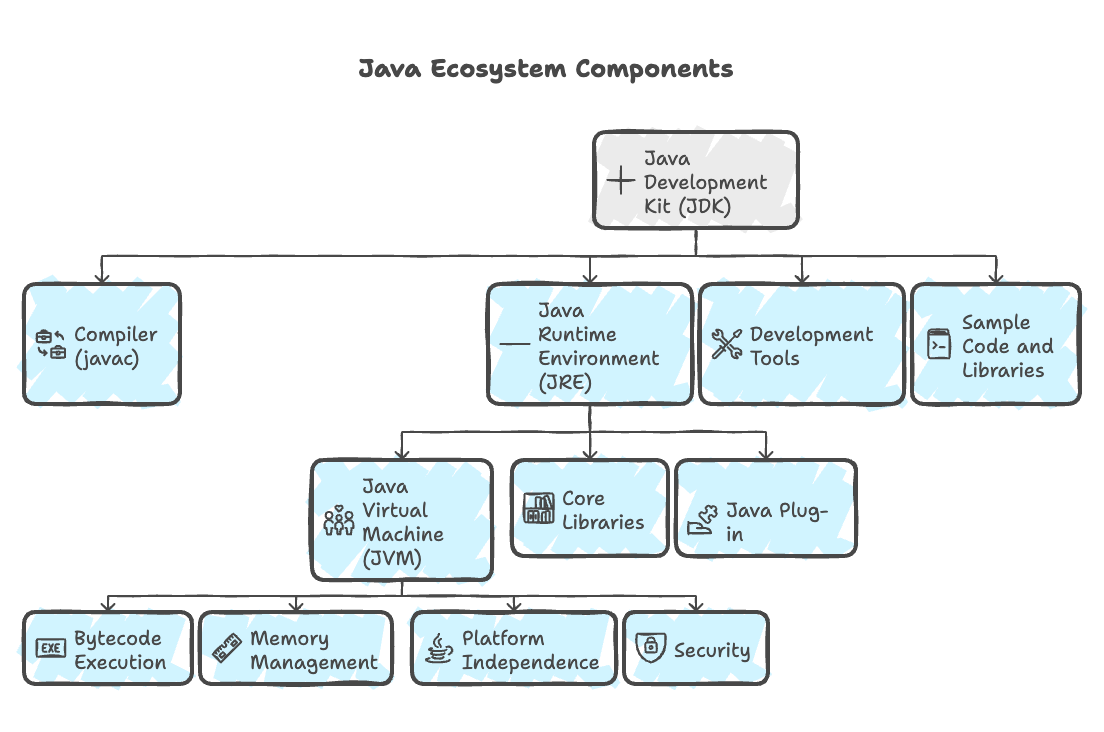
Relationship Between JDK, JRE, and JVM
- JDK: Includes tools for development (e.g., compiler) and the JRE.
- JRE: Provides the runtime environment, including the JVM and class libraries.
- JVM: Executes the bytecode and is part of the JRE.